Arrays Concept
Arrays Concept
Arrays
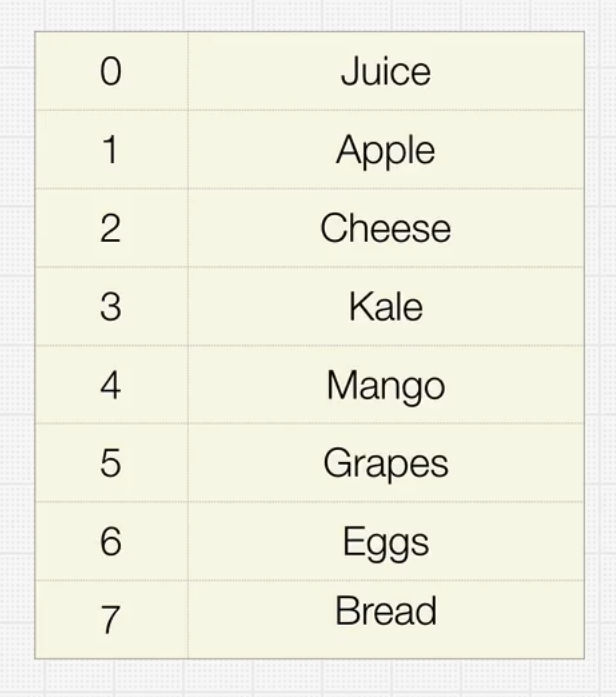
- Similar to List
- Organizes data sequentially
- Stored in contiquous memory in order
Arrays Methods
- lookup
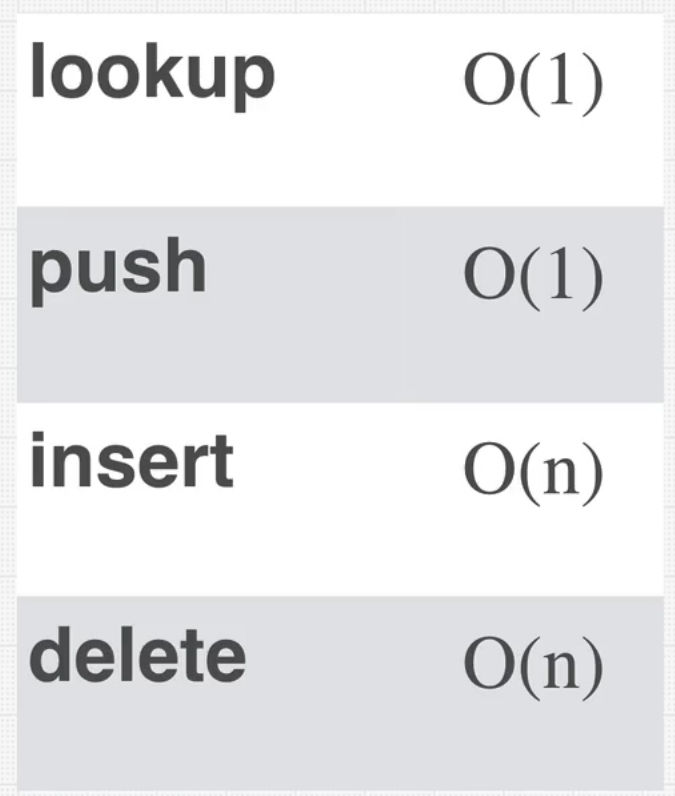
- find the element you are looking for. If you know the index of that element, big O is O(1).
- ex. find third element => array[2]
- push
- insert element from behind of the arrays. bigO is O(1).
- ex. array.push(1);
- insert
- you insert element but in specific location. Let's say you pushed element in the middle of array. Then you have to push other elements behind of the inserted element. This is where you have to iterate over elements and set pushed back indeces for every element. bigO is O(N), since you have to iterate over elements.
- ex. array=[1,2,3,4,6,7]; array.insert(4, 5); insert 5 to index 4 => array = [1,2,3,4,5,6,7]
- delete
- delete element in specific location. Same as above, you have to set changed index for every element. big O is O(N), since you have to iterate over elements.
- ex. array=[1,2,2,3,4,5]; array.delete(2, 2); delete 2 element from index 2=> array = [1,2,3,4,5]
Array Example
	const strings= ['a', 'b', 'c', 'd'];
	const numbers = [1,2,3,4,5];
	// Variable array is somewhere in memory and the computer knows it.
	// When I do array[2], i'm telling the computer, hey go to the array and grab the 3rd item from where the array is stored.

	//push
	strings.push('e'); //O(1)
	console.log(strings);

	//pop
	strings.pop(); //O(1)
	strings.pop(); //O(1)
	console.log(strings);

	//unshift
	strings.unshift('x'); //O(N)
	console.log(strings);

	//splice
	strings.splice(2, 0, 'alien'); //
	console.log(strings)
- strings array takes up 16 bytes totally. 4 bytes * 4 = 16 bytes of storage (1byte = 8bits, charcter needs 1 byte to store data)
- push
- add element at the end of the array
- O(1)
- append
- add element at the end of the array
- But, if it is dynamic array, then this can be O(N). Since you have to loop over the elements and move these elements to different space so we can add more element. #Array Kinds#Dynamic Array
- pop
- remove elemetn from the end of the array
- O(1)
- unshift
- add element at the beginning of the array
- When you add element, then all the other elements should be pushed back towards the end. indeces should be realigned agian. We have to iterate all over.
- O(N)
- splice(start index, delete count, items)
- you can delete and also add by this function.
- Add: splice(2,0,'alien') => go to index of 2, and delete no elements, add 'alien' element to that index place
- you loop half of the elements, since you add element in the place of index 2. You loop after the index of 2. So, bigO would be O(N/2), but according to the rule of bigO Big O#Simplifying Big O#Remove Constants, you get O(N).
- Delete: splice(2,1) => delete 1 element from the index of 2
- you delete index from index 2, and since the index 2 element is gone, all the other elements should be pulled back forwards. This means you have to iterate elements after the index of 2. you get O(N/2), but just like the case above, you get O(N).
Array Kinds
Static Array
- Whole array size is fixed, arrays are allocated in adjacent blocks of memory. You can't keep adding things on after the max array size.
- If you want to add more data after the max size, you copy the whole array and move whole array to different place and allocate more memories so that you can add more elements.
- C++, C ... (Low level languages) - Machine memory management, User have more control over memories so it can be faster
Dynamic Array
- append cab be O(N) according to Dynamic Array
- javascript (High level languages) - Automatic memory management, Machine takes chare of memory management so it can be slower
Implementing an Array
How to build array from the beginning?
class MyArray{
	constructor(){
		this.length = 0;
		this.data = {};
	}
	get(index){
		return this.data[index];
	}
	push(item){
		this.data[this.length] = item;
		this.length++;
		return this;
	}
	pop(){
		const removedItem = this.data[this.length - 1];
		delete this.data[this.length - 1];
		this.length--;
		return removedItem;
	}
	delete(index){
		const item = this.data[index];
		delete this.data[index];
		for(let i = index + 1; i < this.length; i++){
			this.data[index] = this.data[i];
			index++;
		}
		delete this.data[this.length - 1];
		this.length--;
		return item;
	}
	delete2(index){ //different method
		const item = this.data[index];
		this.shiftItems(index);
		this.length--;
		return item;
	}
	shiftItems(index){
		for(let i = index; i < this.length - 1; i++){
			this.data[i] = this.data[i+1];
		}
		delete this.data[this.length - 1];
	}
}
const array = new MyArray();
console.log(array.push(3));
console.log(array.push(5));
console.log(array.get(0));
console.log(array.get(1));
console.log(array.pop());
console.log(array)
console.log(array.pop());
console.log(array)
console.log(array.push('a'));
console.log(array.push('b'));
console.log(array.push('c'));
console.log(array.push('d'));
console.log(array.delete(0));
console.log(array)
console.log(array.delete2(1));
console.log(array)
Developing References
Developing Report
2025-01-14 - Arrays Concept Report
2025-01-14 - Developing Daily Report
2025-01-3th - Developing Weekly Report
